
Campaign statistics
The SweeAnalytics Marketing space shows what happens to your email and SMS campaigns: how many messages arrive, who opens them, who clicks, who unsubscribes, and how many tickets they sell. Click Marketing at the top of the left menu to open it.
Overview
Section titled “Overview”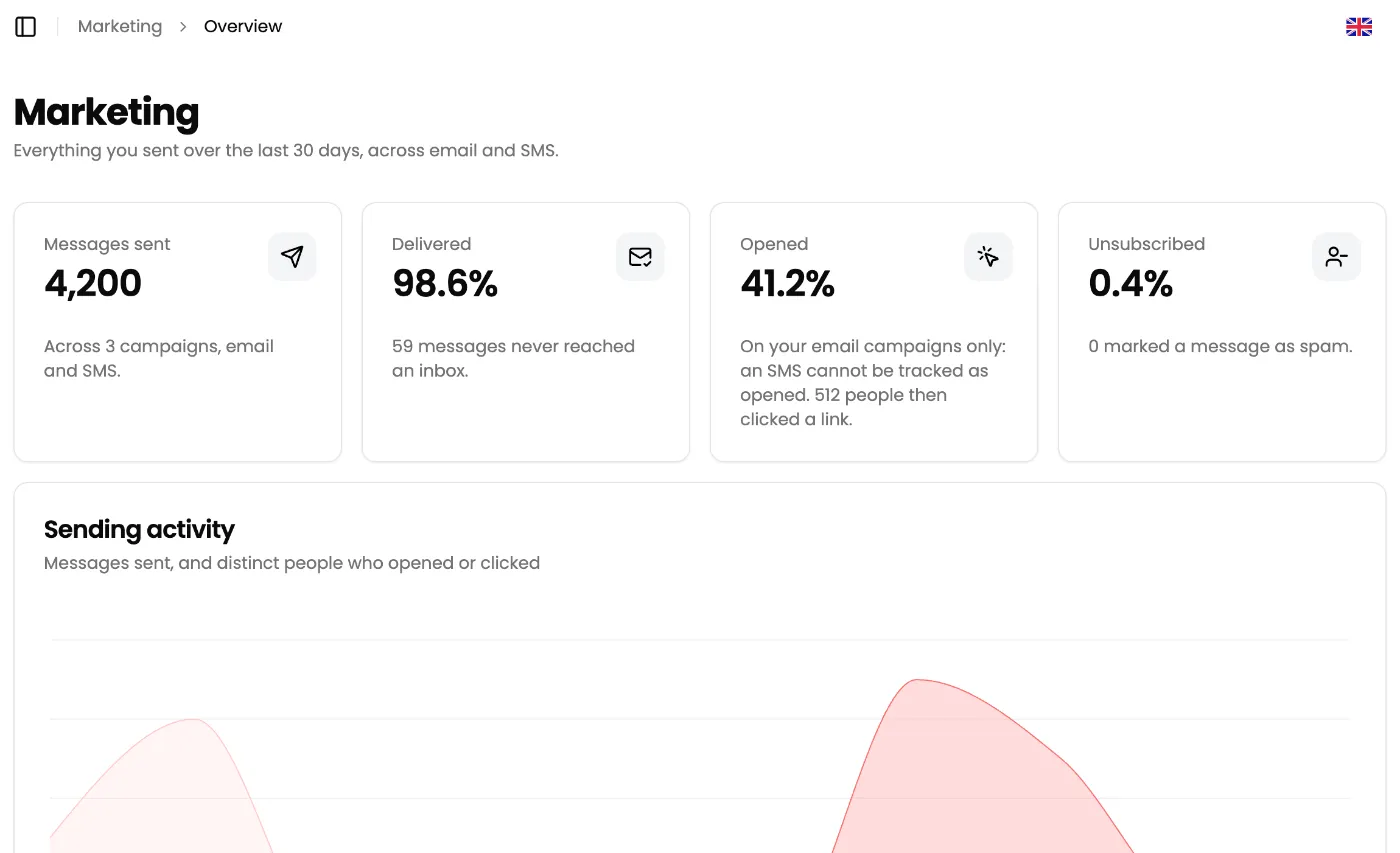
The Overview covers the last 30 days, email and SMS together:
| Card | What it measures |
|---|---|
| Messages sent | The number of messages sent, and the number of campaigns involved. |
| Delivered | The share of messages that reached their destination. The line below says how many never arrived. |
| Opened | The share of delivered emails that were opened. SMS are excluded: their opening cannot be tracked. The line below gives the number of people who then clicked. |
| Unsubscribed | The share of delivered messages followed by an unsubscribe. The line below gives the number of spam complaints. |
The Sending activity chart plots, day by day, the messages sent and the number of distinct people who opened or clicked.
The reputation alert
Section titled “The reputation alert”A red Sending reputation at risk box appears at the top of the view when:
- spam complaints exceed 0.1% of delivered messages;
- invalid addresses (hard bounces) exceed 2% of delivered messages.
In both cases, clean your list before the next send: see Deliverability.
The campaign list
Section titled “The campaign list”Campaigns lists every campaign sent, one row per campaign:
| Column | Content |
|---|---|
| Sent on | Send date. |
| Recipients | Number of recipients. |
| Opened | Share of delivered messages that were opened. A dash for an SMS campaign. |
| Clicked | Share of delivered messages in which a link was clicked. |
| Unsubscribed | Share of delivered messages followed by an unsubscribe. |
| Revenue | Revenue attributed to the campaign, rounded to the euro. |
Click a column header to sort the list, click again to reverse the order. Click a row to open the campaign details.
Campaign details
Section titled “Campaign details”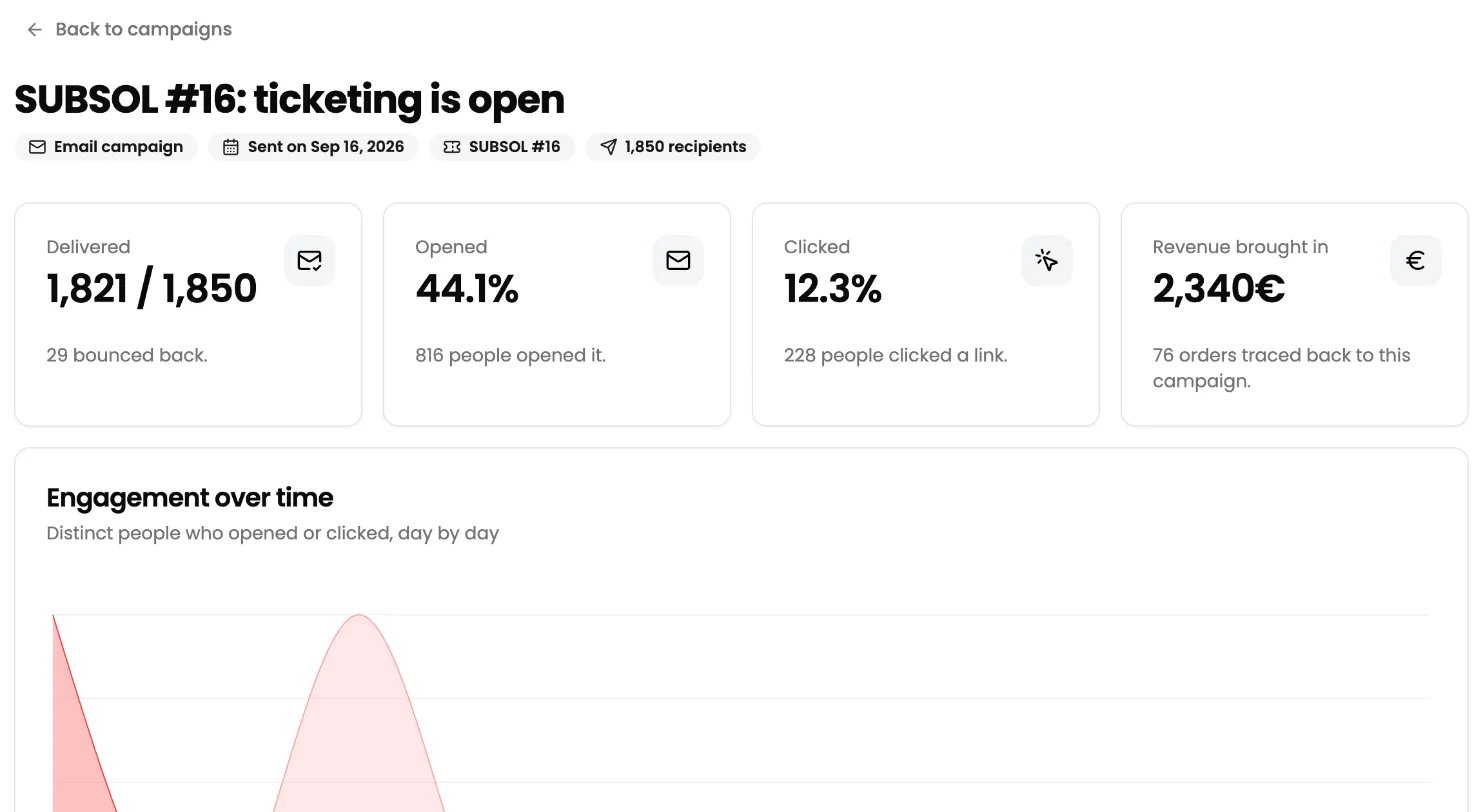
At the top, badges show the channel (Email campaign or SMS campaign), the send date, the promoted event and the number of recipients. Back to campaigns returns to the list.
The cards:
- Delivered: the number of messages delivered out of the number sent, and how many bounced back.
- Opened: the share of delivered messages that were opened, and the number of people. This card does not exist for an SMS campaign.
- Clicked: the share of delivered messages in which a link was clicked, and the number of people.
- Revenue brought in: the amount of tickets bought thanks to the campaign, and the number of orders involved. See How revenue is attributed.
The Engagement over time chart plots, day by day, the distinct people who opened or clicked (clicked only for an SMS).
The Most clicked links table gives the 10 most clicked links, with the number of Clicks and the number of distinct People.
The People who left card shows unsubscribes (number and percentage) and spam complaints.
How revenue is attributed
Section titled “How revenue is attributed”When sending, Sweescape adds a campaign marker to every link in your email or SMS. When a recipient reaches your ticketing page through one of these links:
- the campaign is remembered in their browser tab;
- if they buy in that same tab, the paid tickets are attributed to the campaign;
- if they click a link from another campaign in the meantime, the last campaign clicked wins.
Revenue brought in adds up the tax-inclusive price of paid tickets, after discount codes. Only confirmed tickets count.
A sale is not attributed if:
- the buyer comes back later another way: new tab, other browser, other device, link shared by a friend;
- the campaign promotes a different event from the one bought. A campaign linked to no event can be credited on any of your events;
- the purchase goes through an extension, such as a seating plan: those orders do not carry the campaign marker.
Your list health
Section titled “Your list health”List health shows the people you can no longer write to, and why. Writing to them again would hurt your sender reputation, which is why Sweescape excludes them from sends.
Four cards count your exclusions by reason:
- Unsubscribed: they asked to stop hearing from you;
- Bounced: the address does not exist any more;
- Complaints: they marked a message as spam;
- Added by hand: you blocked these addresses yourself.
The List erosion chart plots, day by day over 30 days, unsubscribes, hard bounces and complaints.
The Suppressed recipients table lists the 200 most recent exclusions: Recipient, Reason (unsubscribe, bounce, complaint…), Since and Until. Permanent means the exclusion does not expire.