
Prices, VAT and fees
On Sweescape, a ticket price includes VAT: it is exactly what the buyer pays. VAT is deducted from that price, never added on top. The money goes straight to your Stripe account, with no commission for Sweescape.
The price you enter includes VAT
Section titled “The price you enter includes VAT”When you create a ticket, you enter its Price incl. VAT (€). Under the field, the Excl. VAT preview shows the amount before tax, calculated with the event’s VAT rate.
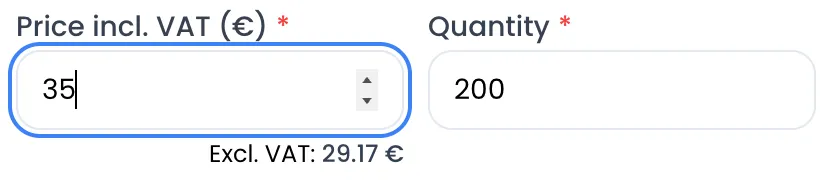
The buyer sees the same price, followed by Incl. taxes, in the purchase window. A line total is always the unit price multiplied by the quantity: 3 tickets at €35 make €105, to the cent.
The event’s VAT rate
Section titled “The event’s VAT rate”The VAT rate is chosen when the event is created, in the VAT field. Five rates are available: 20%, 10%, 5.5%, 2.1% and 0%.
- The rate applies to every ticket of the event. You cannot have two rates on the same event.
- The rate cannot be changed once the event is created. Check it before you confirm, and ask your accountant if in doubt.
VAT is calculated from the VAT-inclusive price: the amount excluding VAT equals the price divided by (1 + rate), rounded to the cent, and the VAT is the difference between the two. Amount excluding VAT plus VAT therefore always adds up exactly to the price paid.
| Ticket (example) | VAT rate | Price incl. VAT | Excl. VAT | VAT |
|---|---|---|---|---|
| Early bird | 5.5% | €25.00 | €23.70 | €1.30 |
| Regular | 20% | €35.00 | €29.17 | €5.83 |
| VIP | 10% | €60.00 | €54.55 | €5.45 |
| Charity entry | 0% | €15.00 | €15.00 | €0.00 |
On an order, VAT is calculated once, on the total. For 3 tickets at €35 with 10% VAT, the order comes to €105.00 including VAT, i.e. €95.45 excluding VAT and €9.55 of VAT. The excl. VAT preview for one ticket (€31.82) multiplied by three gives €95.46: this one-cent gap is normal, the order total is what counts.
Discounts
Section titled “Discounts”A discount code lowers the VAT-inclusive amount paid. VAT is then recalculated on the discounted total.
Example with 20% VAT: 2 “Regular” tickets at €35 and 1 “VIP” ticket at €60 make €130 including VAT. With a 10% code, the discount is €13 and the buyer pays €117 including VAT, i.e. €97.50 excluding VAT and €19.50 of VAT.
A discount targeted at some tickets only applies to them, and a euro discount is taken off once per order. See Discount and access codes.
- 0% Sweescape commission. Sweescape takes nothing from the tickets you sell. Your subscription is billed separately. See Subscription.
- No fees added for the buyer. They pay the displayed price, with no service fee. Only an extension installed on the event can add an amount to the order, for example a paid option.
- Stripe fees are yours. Stripe charges its processing fees on each payment, directly on your Stripe account, according to your account’s pricing. You can find them in your Stripe dashboard.
All prices are in euros. No other currency is available.
The buyer’s invoice
Section titled “The buyer’s invoice”For every paid order, Sweescape issues an invoice in your company’s name as soon as Stripe confirms the payment.
- Issuer: your company, with the details entered in Settings, on your Stripe account card, via Complete your invoice informations (company name, address, SIREN, VAT ID). Fill them in before you open sales.
- Customer: the Fullname and Email the buyer entered in the billing part of the form. If they said they are an organization, the invoice also shows its address and its SIREN or VAT number.
- Content: one line per ticket (ticket name and description, unit price excluding VAT, quantity), any discount, the VAT line and the total including VAT.
- Numbering: invoices are numbered in sequence for your company (INV-000001, INV-000002…).
The buyer receives two emails at the billing address: the invoice, then the payment receipt (numbered PAY-000001, PAY-000002…). Both emails are sent from a Sweescape address and written in English, with the subjects “Invoice for your purchase of” and “Receipt for your purchase of”, followed by the event name.
A free order does not generate an invoice. A refund does not generate a credit note. See Sales, orders and refunds.