
Offer the page in several languages
You can offer your ticketing in French, English and Spanish. Each language has its own page, and a flag picker lets the buyer switch from one to another.
The principle: one event per language
Section titled “The principle: one event per language”A ticketing page is written in a single language. For ticketing in three languages, you create three events, one per language, each with its page, its tickets and its invitation. You then link them together.
What this means:
- Tickets belong to each event. The quantities on sale are not shared: if your venue holds 600 people, split the places between the language versions, for example 450 in French, 100 in English and 50 in Spanish.
- Sales and participants are separate: each version has its own orders, participant list and statistics.
- Emails follow each event’s language: the invitation of the English version is the one you write in the English event.
Create the language versions
Section titled “Create the language versions”-
Finish the main version: tickets, page, invitation. Translating a complete version is easier.
-
Duplicate the event for each other language. The copy keeps the tickets, codes, page (as a draft), invitation and extensions. See Duplicate or delete an event.
-
Translate each copy: the event name in Settings, the page text in the editor, the page title and description (see Colours, fonts and SEO), and the invitation.
-
Translate the tickets if needed. A ticket cannot be edited once created: to show translated ticket names, delete the copied tickets while none has been sold, then create them again in the right language. See Create your tickets.
Link the versions with the language picker
Section titled “Link the versions with the language picker”The Language picker block shows one flag per available language. Clicking a flag takes the buyer to the page of the event in that language.
-
Open the page editor of one of the versions.
-
Add the Language picker block (Images & buttons category), for example at the top of the page, in a Row.
-
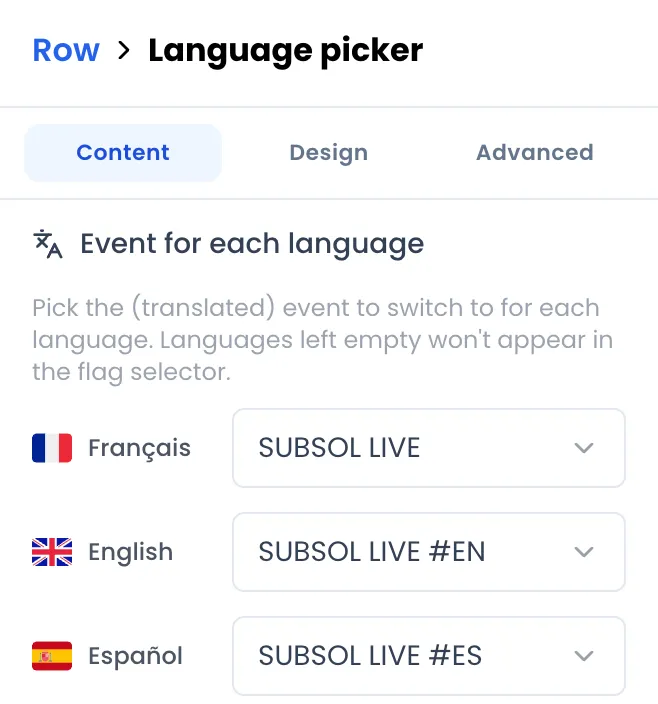
In its Event for each language setting, pick the matching event for each language: Français, English, Español. Leave None for a language you do not offer: its flag will not appear.
-
Save or publish the page.
-
Do the same in the page of each other version, with the same mapping: the picker recognises on its own the language of the page it sits in.
Each version is published separately, from its event’s Ticket tab. See Publish and share the page.
What the buyer sees
Section titled “What the buyer sees”- The page content (titles, text, buttons) is what you wrote for that version.
- Automatic text (purchase window, cookie banner, “Get directions” link, countdown labels) is shown in the buyer’s browser language if it is French, English or Spanish, and in English otherwise. When the buyer picks a language with the picker, that choice is remembered.
All languages on your own domain
Section titled “All languages on your own domain”If you use your own domain, the language versions can share the same address:
| Version | Address |
|---|---|
| First version connected to the domain (for example French) | https://tickets.subsol.fr |
| English | https://tickets.subsol.fr/en |
| Spanish | https://tickets.subsol.fr/es |
Just connect the same domain on each event, choosing its language. Adding a language version does not use up an extra domain from your plan, and there is no DNS record to create again. On your domain, the versions are also presented to search engines as translations of one another. See Put your ticketing on your own domain.