
Deliverability and unsubscribes
Deliverability is the ability of your emails and SMS to actually reach your recipients, and not their spam folder. It depends mostly on your sender reputation: writing to addresses that do not exist or to people who no longer want to hear from you damages it. Sweescape protects it with a suppression list.
The suppression list
Section titled “The suppression list”The suppression list gathers the email addresses and phone numbers your campaigns no longer write to.
- It applies to your whole account. An unsubscribed person no longer receives any campaign from you, whatever audience they are in.
- It is split by channel. Replying STOP to an SMS stops your SMS campaigns, not your email campaigns, and the other way round.
- It only concerns campaigns. Invitations and automations are messages about the event: they still reach the people on the list.
At every campaign send, Sweescape removes everyone on the suppression list from the recipients. A test send to an address on the list is refused.
How someone gets on the list
Section titled “How someone gets on the list”| Reason | What happened | Duration |
|---|---|---|
| Unsubscribe | The person clicked the unsubscribe link at the bottom of a campaign email, used their mailbox’s unsubscribe feature, or replied STOP to a campaign SMS. | Permanent |
| Failed address | The email could not be delivered because the address does not exist or no longer exists. A temporary failure, such as a full mailbox, adds nothing. | 90 days |
| Complaint | The person reported your email as spam. | Permanent |
| Added by hand | You chose Stop sending emails or Stop sending SMS on a contact (see Unsubscribe a contact manually). | Permanent |
This information comes back on its own after each send, without any action from you.
View the list
Section titled “View the list”-
Open your account menu at the top right, then Campaigns.
-
Click the heart-shaped button, next to the + button.
-
The People you can no longer write to window opens.
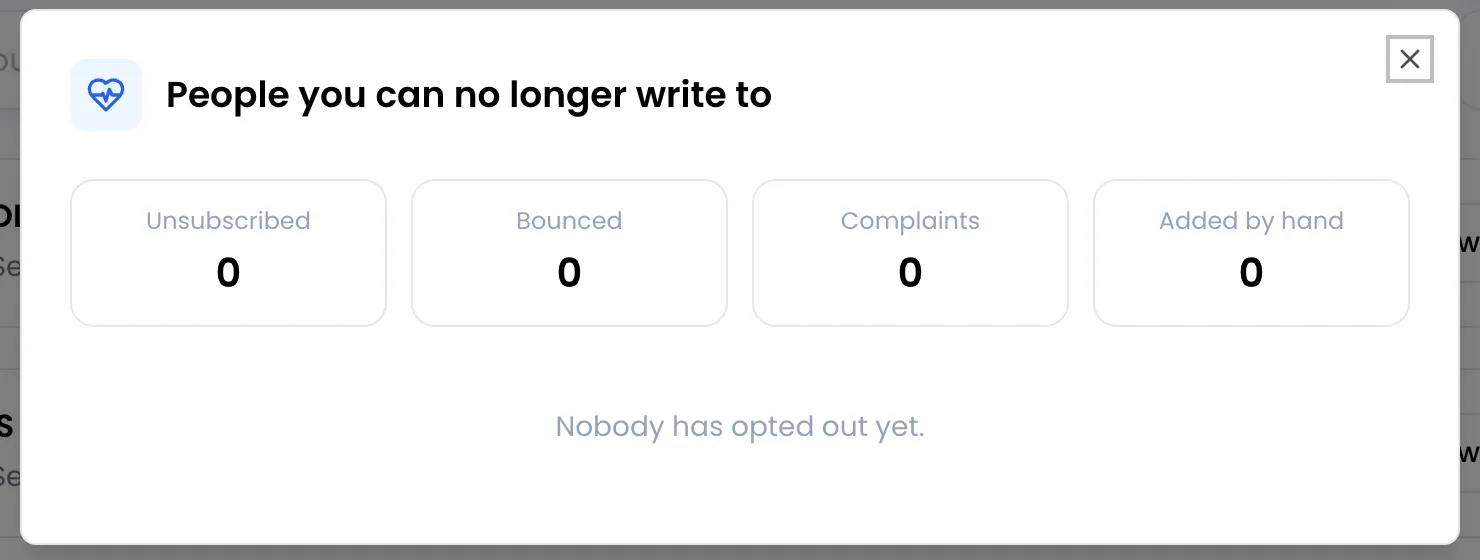
- The Unsubscribed, Bounced, Complaints and Added by hand counters give the number of people per reason.
- The list shows the 200 most recent entries: an email or SMS icon, the address or number, the reason, then Permanent or Until followed by the end date for a failed address. The reason is shown as a code:
unsubscribe,bounce(failed address),complaint,manual(added by hand). - If nobody is on the list, the window shows Nobody has opted out yet.
Remove someone from the list
Section titled “Remove someone from the list”There is no remove button in this window. Open an audience that contains the person, click the gear icon on their row and choose Send emails again or Send SMS again (see Audience contacts and segments).
What the person who unsubscribes sees
Section titled “What the person who unsubscribes sees”Every campaign email ends with a notice added automatically, in French: “Vous recevez ce message parce que vous êtes inscrit à cette liste. Se désinscrire” (“You are receiving this message because you are subscribed to this list. Unsubscribe”). The link is unique to each recipient.
-
The link opens a page titled “Se désinscrire des e-mails” (unsubscribe from emails), which shows the address and states that it will no longer receive campaigns from this organizer. Messages about orders and tickets are still sent.
-
The person clicks “Confirmer la désinscription” (confirm). Nothing is recorded before that click: a mailbox simply previewing the link does not unsubscribe anyone.
-
A You’re unsubscribed confirmation page appears, in the browser’s language.
If the address is already unsubscribed, the page shows “Vous êtes déjà désinscrit” (already unsubscribed). If the link was altered or cut, it shows “Ce lien n’est plus valide” (this link is no longer valid) and asks the person to reply to the message to request their unsubscribe: then unsubscribe them by hand.
Monitor your reputation
Section titled “Monitor your reputation”After each campaign, the Show Statistics button opens its details in SweeAnalytics: delivered, bounced addresses, unsubscribes and spam reports. The Marketing space of SweeAnalytics also shows your list health over time, and flags a risk to your reputation when complaints exceed 0.1% of delivered emails or failed addresses exceed 2%. See Campaign statistics.
Good sending practices
Section titled “Good sending practices”- Only write to people who agreed to receive your messages. A bought or scraped file produces complaints and failed addresses.
- Send from your domain, with its records verified, including the tracking one (see Send from your own domain).
- Separate uses when your plan allows it: one subdomain for campaigns, another for invitations and automations.
- Clean your files before importing: a well-filled email column, without test addresses or typos.
- Target with segments rather than writing to the whole audience every time. A relevant message is reported less often.
- Take care of the subject and preview text, add alternative text to your images and avoid an email made of a single large image.
- Send yourself a test before each campaign, and check the links.
- Look at the figures after sending. Many bounced addresses on an audience point to an old or badly typed list.
- For SMS, keep it short: at most 149 characters of text to fit in a single campaign SMS, because the STOP notice is added when sending.