
Generate tickets with AI
Sweescape’s AI can suggest a ticket line-up (names, descriptions, prices and quantities) based on what you sold over the last twelve months. You review each suggestion and only keep the ones that suit you: nothing is created without your approval.
What the AI relies on
Section titled “What the AI relies on”- Your account’s sales history over the last 12 months, across all your events: for each ticket type, its name, its price and the number sold.
- At least three different ticket types in that history. Otherwise, the message “Not enough data to generate tickets!” appears. The feature is therefore not available for your very first event.
- The dashboard language: suggested names and descriptions are written in the language of your interface.
The AI usually suggests three tickets.
Generate suggestions
Section titled “Generate suggestions”-
Open your event, then the Ticket tab.
-
In the Your Tickets block, click the magic wand icon at the top right of the block. The icon turns into a loading indicator while suggestions are generated.
-
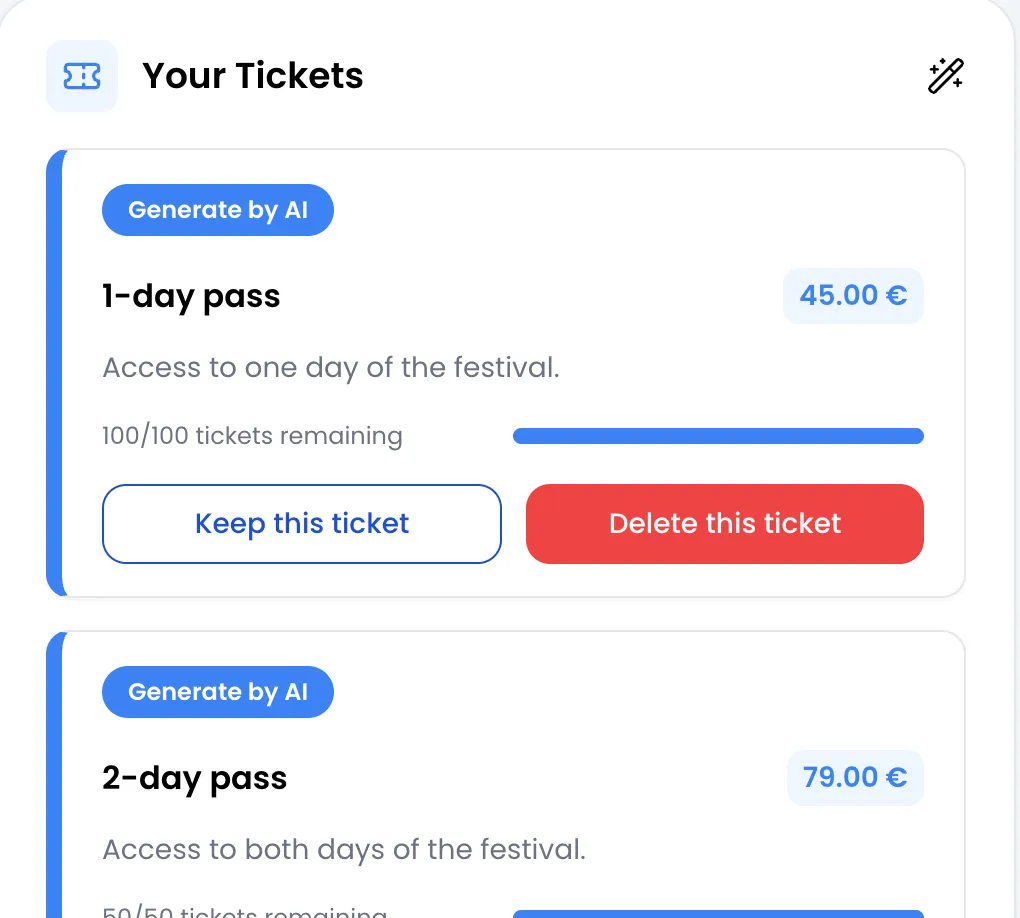
Suggestions appear at the top of the list with the Generate by AI badge. Each one shows a name, a price including VAT, a description and a quantity.
-
For each suggestion, click Keep this ticket to create the ticket, or Delete this ticket to discard it.
When you keep a suggestion, the message “Ticket has been created successfully!” appears and the ticket joins your tickets, just as if you had created it manually.
Review before keeping
Section titled “Review before keeping”A kept ticket is created as is and cannot be edited afterwards. Review each suggestion before clicking Keep this ticket:
- The suggested price becomes the VAT-inclusive price the buyer pays. Make sure it matches the price, VAT included, you want to display.
- The suggested quantity becomes the number of seats on sale.
- The ticket is created visible to everyone, with no per-order minimum or maximum. You can then hide it behind a code from its card.
- The name and description are shown to buyers and printed on their invoice.
If a suggestion is almost right, discard it and create the ticket yourself with Add a ticket: it is the only way to adjust a price or a quantity. See Create and manage tickets.
A suggestion that breaks the ticket rules (title of at least 4 characters, description of at least 10 characters, price with two decimals at most) is not created and an error message says so.
AI credits used
Section titled “AI credits used”Each generation you start uses one AI credit from your monthly allowance. This allowance is shared with Sweescape’s other AI features, depends on your plan and resets on the 1st of each month.
- When the allowance is used up, the message “You have reach your AI limit!” appears and no suggestion is generated.
- When the sales history is too thin, no credit is used.
- Starting a new generation uses a new credit.
See AI in Sweescape and Subscription.