
Open SweeAnalytics
SweeAnalytics is the Sweescape analytics app. For each event it shows your sales, the visits to your ticketing page, your conversions and your attendees’ feedback, along with the results of your email and SMS campaigns.
Open SweeAnalytics
Section titled “Open SweeAnalytics”-
In the dashboard, click your first name in the top right corner to open your account menu.
-
Click SweeAnalytics.
SweeAnalytics opens in the same tab. If you are already signed in to the dashboard, you arrive signed in: both apps share the same account.
-
SweeAnalytics shows the Dashboard of the event you created most recently.
If the sign-in screen appears, enter the email and password of your Sweescape account, then click Log in. The Create here link leads to the dashboard sign-up page.
Find your way around the menu
Section titled “Find your way around the menu”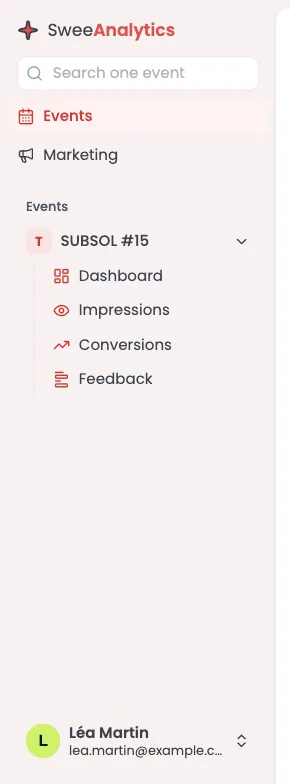
The left menu has two spaces, which you switch between with the buttons at the top:
- Events: the list of your events, newest first. The first one is expanded. Each event gives access to four views:
- Dashboard: sales, average cart, attendance rate and hourly check-ins (Sales and traffic);
- Impressions: visits to the ticketing page, devices, traffic sources and countries (Sales and traffic);
- Conversions: top selling tickets, abandoned carts and conversion funnel (Conversions and carts);
- Feedback: your attendees’ reviews (Attendee feedback).
- Marketing: Overview, Campaigns and List health, the statistics of your sends (Campaign statistics).
To find an event, type part of its name in Search one event, at the top of the menu. This field only appears in the Events space.
The button in the top left corner of each view collapses the menu to give the charts more room. The flag in the top right corner changes the SweeAnalytics language (French, English, Spanish).
At the bottom of the menu, your name opens a menu with SweeBadge, to go back to the dashboard, and Log out.
What SweeAnalytics counts
Section titled “What SweeAnalytics counts”- Only events created with your account are listed. An event you were invited to as a collaborator does not appear.
- Sales are those made on your ticketing page. An attendee added by hand or imported from a file is not a sale. Free tickets ordered on the page count as sales at €0.
- Figures load when you open the view. Reload the page to refresh them.